Astra Linux SE 1.8 · Beta · EAS 1.68
EAS-Trial auf Astra Linux
Schlüssel für 90 Tage — nur Astra-Server. Zuerst Schlüssel anfordern, dann Installationsbefehl an die IT. Den Ubuntu-curl nicht verwenden. Demo·Zutritt auf Ubuntu·Zutritt auf Astra Linux.Zutritt auf Astra Linux·Blog guide·Demo.Zutritt auf Windows Server·Zutritt auf Ubuntu·Demo.
Astra-Pilot: voller Stack Zutritt + Video + Lageplan; Schlüssel aktiviert nur auf Astra SE 1.8. Zutritt auf Astra Linux.
Ein Astra-Schlüssel aktiviert nicht auf Ubuntu. Laufzeit — 90 Tage ab Aktivierung.
Schritt 1. Trial-Schlüssel anfordern (90 Tage)
Arbeits-E-Mail und Astra-Track angeben — Schlüssel per E-Mail. Nach der Installation auf Astra in der Admin aktivieren.
The key has been sent by email.
Posteingang prüfen (auch Spam). Admin → Lizenz → Schlüssel einfügen. Laufzeit: 90 Tage ab Aktivierung auf Astra.
The key is also available in your personal account - log in using the same email. — anmelden.
Schritt 2. Installation auf Astra-Server (für IT)
Auf sauberem Astra SE 1.8 den Befehl aus dem Release-Baum ausführen. Ubuntu-curl von der Website nicht starten — er zielt auf Ubuntu-Spiegel und bricht Astra-Repos.
Wichtig: curl … install-eas-from-hub.sh nur für Ubuntu. Auf Astra nur install-eas-astra-from-hub.sh.
- Verzeichnis deploy/astra auf den Server kopieren (oder volles Hub-Release, wenn Bundle Astra enthält).
- The command downloads eas-native from the hub and runs deploy/astra/install.sh (no Ubuntu mirrors).
- http://<server>:8000/admin öffnen und den Trial-Schlüssel unter Lizenz einfügen.
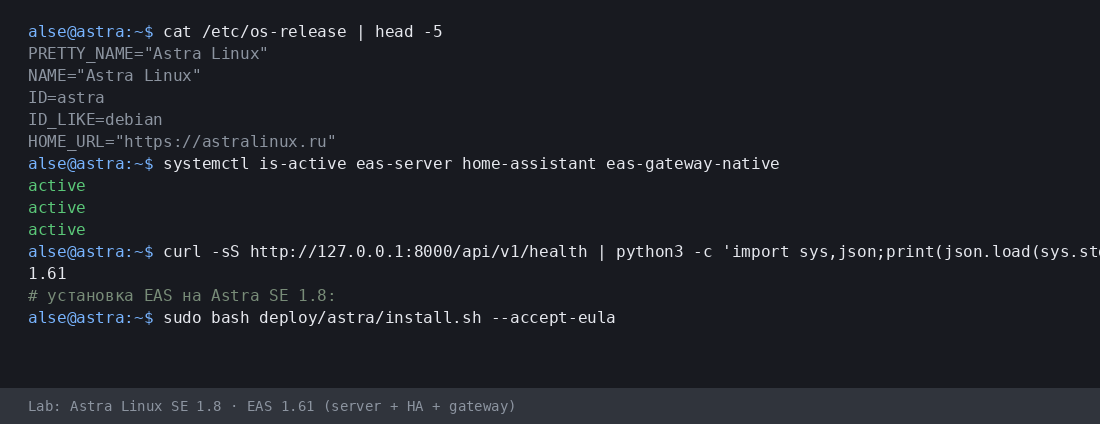
Mehr:Zutritt auf Astra Linux·Blog guide.
- Astra-Installationsskript (.sh) herunterladen
- EAS-Paket (.tar.gz) herunterladen, Online · online install — needs OS mirrors / usually PyPI
- Linux/Astra Offline-Fat herunterladen (.tar.gz) · no PyPI; OS apt mirrors still needed
- Download setup.exe · GUI wizard
- Download offline ZIP · no PyPI
- Download setup.exe to an admin PC or the server.
- Run the wizard, wait for EAS services, open http://localhost:8000/admin.
- Paste the trial key on the License tab.
Product page:Zutritt auf Windows Server.
Version 1.68 · Astra SE 1.8 Beta · 90-Tage-Trial · Telegram-Support
Vor der Installation
- Der Testschlüssel ist an das Betriebssystem gebunden: Ubuntu (30 Tage), Astra (90 Tage) oder Windows (90 Tage). Ein Schlüssel für ein anderes System lässt sich nicht aktivieren.
- Windows: setup.exe and offline ZIP — /download/windows/. Ubuntu/Astra: .sh, online .tar.gz, and offline fat — /docs/ and /docs/install/. Fat is shared for Ubuntu and Astra.
- Unter Windows Server läuft Home Assistant nur auf einer separaten Linux-Maschine (in EAS: IP + Token). Kein HA auf derselben Windows-Box.
- Unter Astra im advanced-Modus kann EAS neben MIC laufen — nach Servervorbereitung mit einem Ingenieur. Keine Zertifizierung und keine MRD-Unterstützung.
Probleme bei der Installation?Schreiben Sie in EAS Support— Fragen und Fehler nach Sprache, kostenlos.
Aktuelle Version · 1.68
EAS 1.68· patch 1.68· mobile 0.5.67· TV Wall 0.5.43
Minimaler Pilot
- EAS-Admin öffnen — http://<Server>:8000/admin (Login in /etc/eas/eas.bootstrap.credentials)
- Registerkarte Lizenz — Schlüssel einfügen und Aktivieren
- ZKTeco-C3-Controller hinzufügen — Bereich Geräte
Später (optional)
- Home Assistant und Sensoren — wenn Telemetrie auf dem Plan nötig ist
- Mobile App — APK auf dem EAS-Hub
- Updates — Administration → Hub-Update
Detailed instructions with screenshots — in the EAS docs. Dokumente.Lost your key? Personal account. anmelden.