EAS-Trial installieren · EAS 1.68
EAS-Trial installieren
Pick the server OS: Ubuntu, Astra, or Windows. Forward install to IT and request a trial key below — validate access, video, and the floor plan on a real site. Demo·Zutritt auf Ubuntu·Zutritt auf Astra Linux.Zutritt auf Astra Linux·Blog guide·Demo.Zutritt auf Windows Server·Zutritt auf Ubuntu·Demo.
Erster Pilot — Produktion; 30.000 ₽ ohne Türgebühr, Updates optional. Fallstudie erster Standort.
Ein Astra-Schlüssel aktiviert nur auf Astra. Ein-Befehl-Installation = Ubuntu; für Astra siehe Beta-Seite. Zutritt auf Astra Linux.
Schritt 2. Trial-Schlüssel (auch nach der Installation)
Geben Sie eine geschäftliche E-Mail und das Server-OS an — der Schlüssel kommt per Mail (Ubuntu 30 Tage, Astra SE 1.8 Beta 90 Tage oder Windows 90 Tage). Aktivierung in der Admin nach der Installation.
The key has been sent by email.
E-Mail prüfen (auch Spam). Admin → Lizenz → Schlüssel einfügen. Laufzeit: 30 Tage (Ubuntu) oder 90 Tage (Astra-Beta / Windows) ab Aktivierung.
The key is also available in your personal account - log in using the same email. — anmelden.
Schritt 1. Server-Installation (für IT)
Befehl an den Server-Admin senden oder selbst kopieren. Stabil: sauberes Ubuntu 22.04+. Für Astra SE 1.8 den Beta-Installer (siehe Astra-Seite).
Was dieser Befehl tut
- Lädt den offiziellen EAS-Installer von asceas.ru (nicht von fremdem GitHub).
- Installiert Ubuntu-systemd-Dienste: EAS-Server, Datenbank und bei Bedarf ACS-Gateway.
- Akzeptiert die Nutzungsvereinbarung mit EAS_ACCEPT_EULA=1 in der Kommandozeile — ohne versteckte Abfragen.
- Die Skript-URL oben ist offen — zuerst herunterladen und lesen möglich.
SHA-256 von install-eas-from-hub.sh:e62aa65c1cc611ffc397278d3eb8a88a9ac6f9c981a5d92b41b93d164e9e17a7
Prüfung: curl -fsSL …/install-eas-from-hub.sh | sha256sum — die Summe muss übereinstimmen.
- Ubuntu-Installationsskript (.sh) herunterladen
- EAS-Paket (.tar.gz) herunterladen, Online · online install — needs OS mirrors / usually PyPI
- Linux/Astra Offline-Fat herunterladen (.tar.gz) · no PyPI; OS apt mirrors still needed
- Verzeichnis deploy/astra auf den Server kopieren (oder volles Hub-Release, wenn Bundle Astra enthält).
- The command downloads eas-native from the hub and runs deploy/astra/install.sh (no Ubuntu mirrors).
- http://<server>:8000/admin öffnen und den Trial-Schlüssel unter Lizenz einfügen.
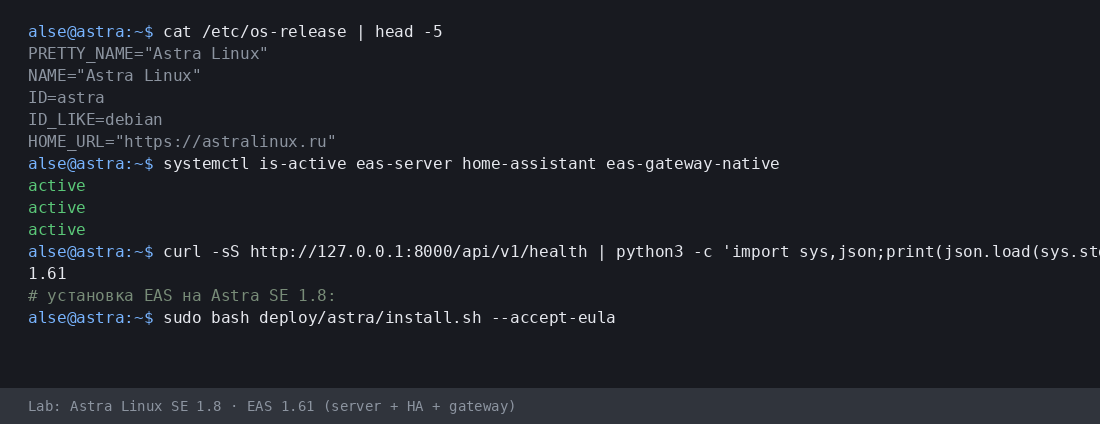
Mehr:Zutritt auf Astra Linux·Blog guide.
- Astra-Installationsskript (.sh) herunterladen
- EAS-Paket (.tar.gz) herunterladen, Online · online install — needs OS mirrors / usually PyPI
- Linux/Astra Offline-Fat herunterladen (.tar.gz) · no PyPI; OS apt mirrors still needed
- Download setup.exe · GUI wizard
- Download offline ZIP · no PyPI
- Download setup.exe to an admin PC or the server.
- Run the wizard, wait for EAS services, open http://localhost:8000/admin.
- Paste the trial key on the License tab.
Product page:Zutritt auf Windows Server.
Version 1.68 · Ubuntu 30 days · Astra/Windows 90 days · Telegram support
Vor der Installation
- Der Testschlüssel ist an das Betriebssystem gebunden: Ubuntu (30 Tage), Astra (90 Tage) oder Windows (90 Tage). Ein Schlüssel für ein anderes System lässt sich nicht aktivieren.
- Windows: setup.exe and offline ZIP — /download/windows/. Ubuntu/Astra: .sh, online .tar.gz, and offline fat — /docs/ and /docs/install/. Fat is shared for Ubuntu and Astra.
- Unter Windows Server läuft Home Assistant nur auf einer separaten Linux-Maschine (in EAS: IP + Token). Kein HA auf derselben Windows-Box.
- Unter Astra im advanced-Modus kann EAS neben MIC laufen — nach Servervorbereitung mit einem Ingenieur. Keine Zertifizierung und keine MRD-Unterstützung.
Probleme bei der Installation?Schreiben Sie in EAS Support— Fragen und Fehler nach Sprache, kostenlos.
Aktuelle Version · 1.68
EAS 1.68· patch 1.68· mobile 0.5.67· TV Wall 0.5.43
Minimaler Pilot
- EAS-Admin öffnen — http://<Server>:8000/admin (Login in /etc/eas/eas.bootstrap.credentials)
- Registerkarte Lizenz — Schlüssel einfügen und Aktivieren
- ZKTeco-C3-Controller hinzufügen — Bereich Geräte
Später (optional)
- Home Assistant und Sensoren — wenn Telemetrie auf dem Plan nötig ist
- Mobile App — APK auf dem EAS-Hub
- Updates — Administration → Hub-Update
Detailed instructions with screenshots — in the EAS docs. Dokumente.Lost your key? Personal account. anmelden.