Astra Linux SE 1.8 · beta · EAS 1.68
EAS trial on Astra Linux
A 90-day key — Astra servers only. Request the key first, then forward the install command to IT. Do not use the Ubuntu curl command. デモ·Ubuntuの入退室管理·Astra Linuxの入退室管理.Astra Linuxの入退室管理·Blog guide·デモ.Windows Serverの入退室管理·Ubuntuの入退室管理·デモ.
Astra pilot: full ACS + video + floor plan stack; the key activates only on Astra SE 1.8. Astra Linuxの入退室管理.
An Astra key will not activate on Ubuntu. Term — 90 days from activation.
Step 1. Request a trial key (90 days)
Enter a work email and the Astra track — the key arrives by email. Activate it in admin after installing on Astra.
The key has been sent by email.
Check your inbox (and Spam). Admin → License → paste the key. Term: 90 days from activation on Astra.
The key is also available in your personal account - log in using the same email. — サインイン.
Step 2. Install on an Astra server (for IT)
On clean Astra SE 1.8 run the command below — it downloads the release from the hub and starts the Astra installer. Do not use the Ubuntu curl from the site.
Important: curl … install-eas-from-hub.sh is Ubuntu-only. On Astra use only install-eas-astra-from-hub.sh.
- Copy the command for IT or run it yourself on Astra SE 1.8 with internet access.
- The command downloads eas-native from the hub and runs deploy/astra/install.sh (no Ubuntu mirrors).
- Open http://<server>:8000/admin and paste the trial key on the License tab.
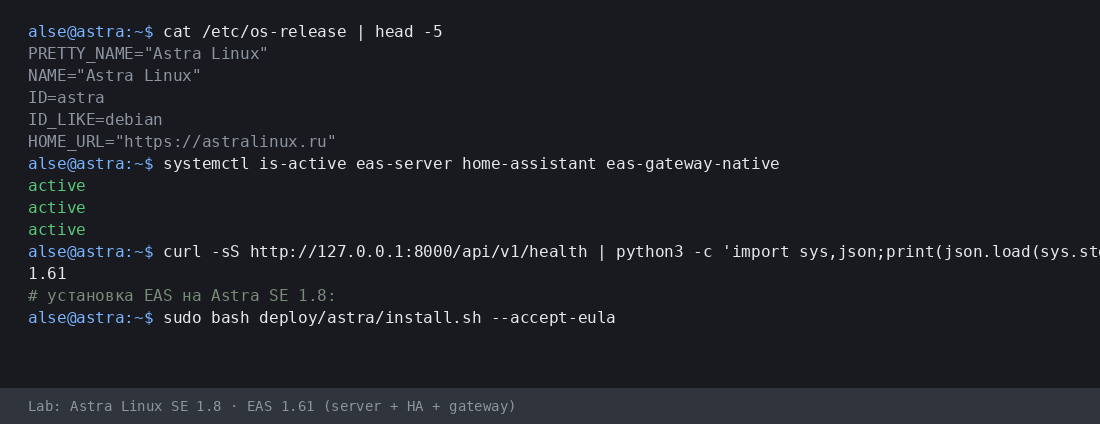
More:Astra Linuxの入退室管理·Blog guide.
- Astra インストールスクリプト (.sh) をダウンロード
- EAS パッケージ (.tar.gz) をダウンロード(オンライン) · online install — needs OS mirrors / usually PyPI
- Linux/Astra オフライン fat をダウンロード (.tar.gz) · no PyPI; OS apt mirrors still needed
- Download setup.exe · GUI wizard
- Download offline ZIP · no PyPI
- Download setup.exe to an admin PC or the server.
- Run the wizard, wait for EAS services, open http://localhost:8000/admin.
- Paste the trial key on the License tab.
Product page:Windows Serverの入退室管理.
Version 1.68 · Astra SE 1.8 beta · 90-day trial · Telegram support
インストールの前に
- トライアルキーはOSに紐づきます:Ubuntu(30日)、Astra(90日)、Windows(90日)。別OSのキーは有効化できません。
- Windows: setup.exe and offline ZIP — /download/windows/. Ubuntu/Astra: .sh, online .tar.gz, and offline fat — /docs/ and /docs/install/. Fat is shared for Ubuntu and Astra.
- Windows Server では Home Assistant は別の Linux 機のみ(EAS では IP とトークン)。Windows 本体上の HA はありません。
- Astra の advanced モードでは、技術者とサーバー準備後に EAS を MIC と共存できます。認証でも MRD サポートでもありません。
インストールで困っていますか?EAS Supportに書く— 言語別の質問と不具合、無料。
現在のバージョン · 1.68
EAS 1.68· patch 1.68· mobile 0.5.67· TV Wall 0.5.43
最小パイロット
- Open EAS Admin — http://<server>:8000/admin (login in /etc/eas/eas.bootstrap.credentials)
- License tab — paste the trial key and click Activate
- Add a ZKTeco C3 controller — Equipment section
後で(任意)
- Home Assistant and sensors — when you need telemetry on the floor plan
- Mobile app — APK on the EAS hub
- Updates — Administration → Hub update
Detailed instructions with screenshots — in the EAS docs. ドキュメント.Lost your key? Personal account. サインイン.