安裝 EAS 試用 · EAS 1.68
安裝 EAS 試用
Pick the server OS: Ubuntu, Astra, or Windows. Forward install to IT and request a trial key below — validate access, video, and the floor plan on a real site. 示範·Ubuntu 上門禁·Astra Linux 上門禁.Astra Linux 上門禁·Blog guide·示範.Windows Server 上門禁·Ubuntu 上門禁·示範.
首個試點——生產現場;30 000 ₽ 無按門收費,更新可選。 首個現場案例.
An Astra key activates only on Astra. One-command install is for Ubuntu; for Astra see the beta support page. Astra Linux 上門禁.
步驟 2. 試用金鑰(安裝後也可)
填寫工作信箱與伺服器作業系統 — 金鑰會寄到信箱(Ubuntu 30天、Astra SE 1.8 測試版 90天或 Windows 90天)。安裝後在管理後台啟用。
密鑰已透過電子郵件發送。
請檢查郵件(含垃圾郵件)。管理 → 授權 → 貼上金鑰。期限:Ubuntu 30天,或 Astra 測試版 / Windows 90天(自啟用起)。
此金鑰也可在您的個人帳戶中使用 - 使用相同電子郵件登入。 — 登入.
步驟 1. 伺服器安裝(給 IT)
Forward this command to the server admin or copy it yourself. GA target is clean Ubuntu 22.04+. For Astra SE 1.8 use the beta installer (see the Astra page).
這條指令做什麼
- 從 asceas.ru 下載官方 EAS 安裝腳本(不是隨便的 GitHub)。
- 安裝 Ubuntu systemd 服務:EAS 伺服器、資料庫,以及需要時的門禁閘道。
- 透過指令中的 EAS_ACCEPT_EULA=1 接受使用者協議——沒有隱藏步驟。
- 上方腳本 URL 可公開存取——可先下載閱讀。
install-eas-from-hub.sh 的 SHA-256:e62aa65c1cc611ffc397278d3eb8a88a9ac6f9c981a5d92b41b93d164e9e17a7
校驗:curl -fsSL …/install-eas-from-hub.sh | sha256sum — 摘要須一致。
- 下載 Ubuntu 安裝指令碼 (.sh)
- 下載 EAS 套件 (.tar.gz),線上安裝 · online install — needs OS mirrors / usually PyPI
- 下載 Linux/Astra 離線包 (.tar.gz) · no PyPI; OS apt mirrors still needed
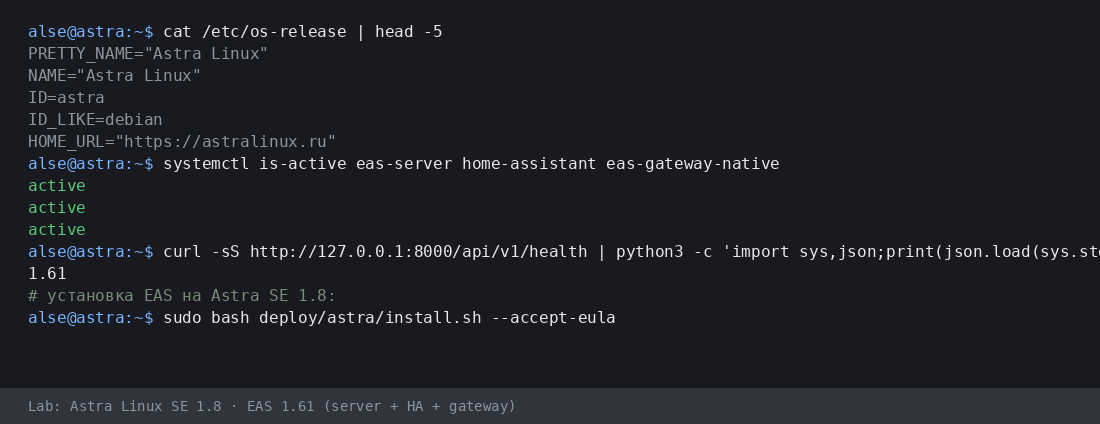
- Copy the command for IT or run it yourself on Astra SE 1.8 with internet access.
- The command downloads eas-native from the hub and runs deploy/astra/install.sh (no Ubuntu mirrors).
- Open http://<server>:8000/admin and paste the trial key on the License tab.
More:Astra Linux 上門禁·Blog guide.
- 下載 Astra 安裝指令碼 (.sh)
- 下載 EAS 套件 (.tar.gz),線上安裝 · online install — needs OS mirrors / usually PyPI
- 下載 Linux/Astra 離線包 (.tar.gz) · no PyPI; OS apt mirrors still needed
- Download setup.exe · GUI wizard
- Download offline ZIP · no PyPI
- Download setup.exe to an admin PC or the server.
- Run the wizard, wait for EAS services, open http://localhost:8000/admin.
- Paste the trial key on the License tab.
Product page:Windows Server 上門禁.
Version 1.68 · Ubuntu 30 days · Astra/Windows 90 days · Telegram support
安裝前須知
- 試用金鑰綁定作業系統:Ubuntu(30天)、Astra(90天)或 Windows(90天)。其他系統的金鑰無法啟用。
- Windows: setup.exe and offline ZIP — /download/windows/. Ubuntu/Astra: .sh, online .tar.gz, and offline fat — /docs/ and /docs/install/. Fat is shared for Ubuntu and Astra.
- 在 Windows Server 上,Home Assistant 只能裝在另一台 Linux 機器(EAS 填 IP 與權杖)。Windows 本機不提供 HA。
- 在 Astra 進階模式下,經工程師完成伺服器準備後,EAS 可與 MIC 共存。這不是認證,也不支援 MRD。
安裝遇到問題?到 EAS Support 提問— 依語言提問與回報,免費。
目前版本 · 1.68
EAS 1.68· patch 1.68· mobile 0.5.67· TV Wall 0.5.43
最小試點
- Open EAS Admin — http://<server>:8000/admin (login in /etc/eas/eas.bootstrap.credentials)
- License tab — paste the trial key and click Activate
- Add a ZKTeco C3 controller — Equipment section
稍後(可選)
- Home Assistant and sensors — when you need telemetry on the floor plan
- Mobile app — APK on the EAS hub
- Updates — Administration → Hub update
Detailed instructions with screenshots — in the EAS docs. 文件.Lost your key? Personal account. 登入.