Installa la prova EAS · EAS 1.68
Installa la prova EAS
Pick the server OS: Ubuntu, Astra, or Windows. Forward install to IT and request a trial key below — validate access, video, and the floor plan on a real site. Dimostrazione·Controllo accessi su Ubuntu·Controllo accessi su Astra Linux.Controllo accessi su Astra Linux·Blog guide·Dimostrazione.Controllo accessi su Windows Server·Controllo accessi su Ubuntu·Dimostrazione.
Primo pilota — produzione; 30.000 ₽ senza costo per porta, aggiornamenti opzionali. Caso del primo sito.
An Astra key activates only on Astra. One-command install is for Ubuntu; for Astra see the beta support page. Controllo accessi su Astra Linux.
Passo 2. Chiave trial (anche dopo)
Inserite un’email di lavoro e l’OS del server — la chiave arriva via mail (Ubuntu 30 giorni, Astra SE 1.8 beta 90 giorni o Windows 90 giorni). Attivatela in admin dopo l’installazione.
The key has been sent by email.
Controllate la posta (e Spam). Admin → Licenza → incollate la chiave. Durata: 30 giorni (Ubuntu) o 90 giorni (Astra beta / Windows) dall’attivazione.
The key is also available in your personal account - log in using the same email. — Registrazione.
Passo 1. Installazione server (per IT)
Forward this command to the server admin or copy it yourself. GA target is clean Ubuntu 22.04+. For Astra SE 1.8 use the beta installer (see the Astra page).
Cosa fa questo comando
- Scarica l’installer ufficiale EAS da asceas.ru (non da un GitHub a caso).
- Installa servizi systemd su Ubuntu: server EAS, database e gateway ACS se serve.
- Accetta l’accordo utente con EAS_ACCEPT_EULA=1 nel comando — senza passaggi nascosti.
- L’URL dello script sopra è aperta — puoi scaricarlo e leggerlo prima.
SHA-256 di install-eas-from-hub.sh:e62aa65c1cc611ffc397278d3eb8a88a9ac6f9c981a5d92b41b93d164e9e17a7
Verifica: curl -fsSL …/install-eas-from-hub.sh | sha256sum — deve coincidere.
- Scarica script di installazione Ubuntu (.sh)
- Scarica pacchetto EAS (.tar.gz), online · online install — needs OS mirrors / usually PyPI
- Scarica fat offline Linux/Astra (.tar.gz) · no PyPI; OS apt mirrors still needed
- Copy the command for IT or run it yourself on Astra SE 1.8 with internet access.
- The command downloads eas-native from the hub and runs deploy/astra/install.sh (no Ubuntu mirrors).
- Open http://<server>:8000/admin and paste the trial key on the License tab.
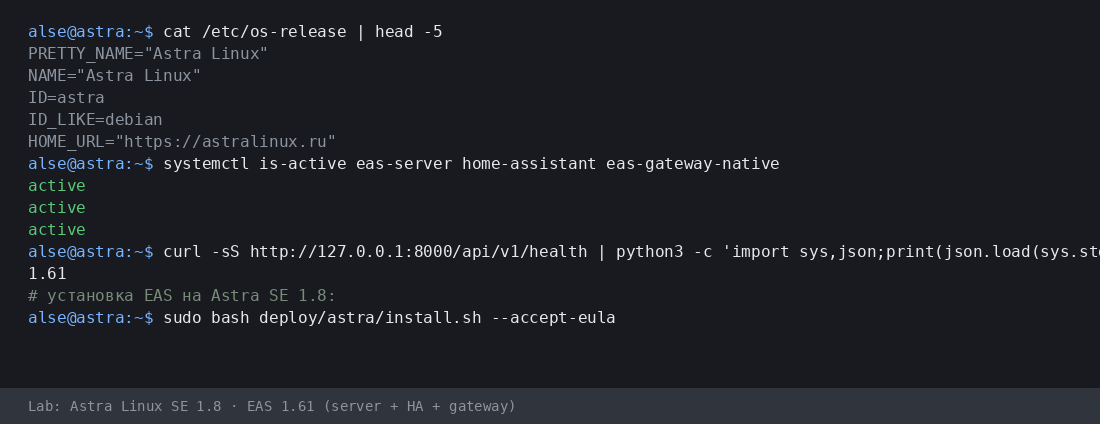
More:Controllo accessi su Astra Linux·Blog guide.
- Scarica script di installazione Astra (.sh)
- Scarica pacchetto EAS (.tar.gz), online · online install — needs OS mirrors / usually PyPI
- Scarica fat offline Linux/Astra (.tar.gz) · no PyPI; OS apt mirrors still needed
- Download setup.exe · GUI wizard
- Download offline ZIP · no PyPI
- Download setup.exe to an admin PC or the server.
- Run the wizard, wait for EAS services, open http://localhost:8000/admin.
- Paste the trial key on the License tab.
Product page:Controllo accessi su Windows Server.
Version 1.68 · Ubuntu 30 days · Astra/Windows 90 days · Telegram support
Prima dell'installazione
- La chiave di prova è legata al sistema: Ubuntu (30 giorni), Astra (90 giorni) o Windows (90 giorni). Una chiave di un altro OS non si attiva.
- Windows: setup.exe and offline ZIP — /download/windows/. Ubuntu/Astra: .sh, online .tar.gz, and offline fat — /docs/ and /docs/install/. Fat is shared for Ubuntu and Astra.
- Su Windows Server, Home Assistant solo su una macchina Linux separata (in EAS: IP e token). Niente HA sulla stessa macchina Windows.
- Su Astra in modalità advanced, EAS può coesistere con MIC dopo la preparazione del server con un ingegnere. Non è certificazione né supporto MRD.
Problemi in installazione?Scrivi in EAS Support— domande e bug per lingua, gratis.
Versione attuale · 1.68
EAS 1.68· patch 1.68· mobile 0.5.67· TV Wall 0.5.43
Pilota minimo
- Open EAS Admin — http://<server>:8000/admin (login in /etc/eas/eas.bootstrap.credentials)
- License tab — paste the trial key and click Activate
- Add a ZKTeco C3 controller — Equipment section
Più tardi (opzionale)
- Home Assistant and sensors — when you need telemetry on the floor plan
- Mobile app — APK on the EAS hub
- Updates — Administration → Hub update
Detailed instructions with screenshots — in the EAS docs. Documenti.Lost your key? Personal account. Registrazione.